
Team Dispatch Alerts: how team members opt in
Last updated November 10, 2026
Tap-In Bros LLC sends work-related text messages only to its own team members (employees and contractors), and only after each person opts in. We do not text customers through this program and never send marketing texts.
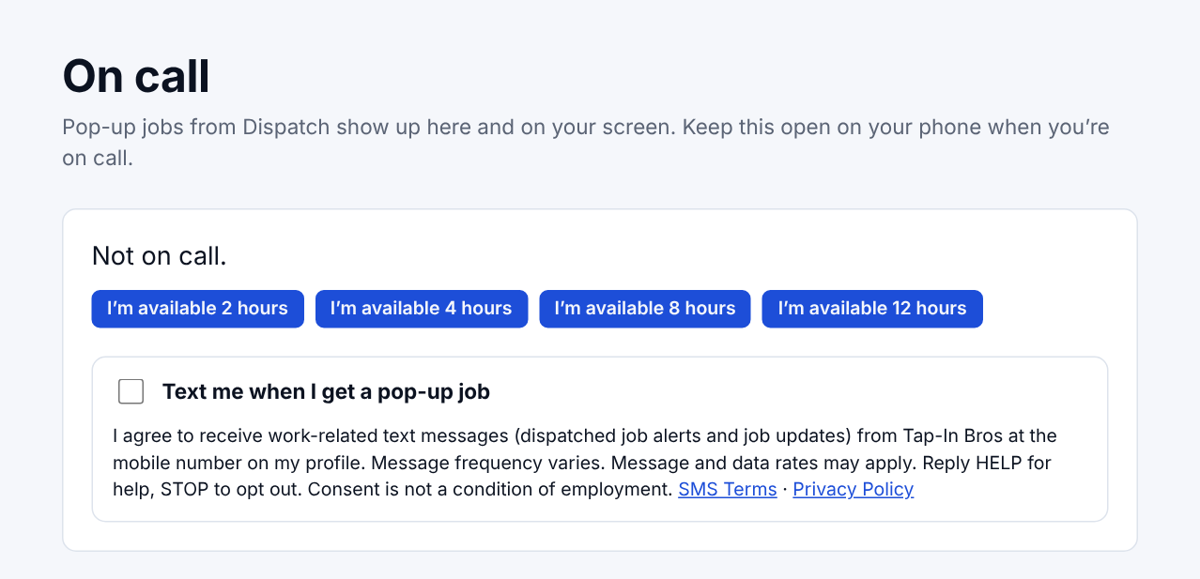
Opt-in method: staff portal checkbox
- The team member signs in to the Tap-In Bros LLC staff portal with their own account.
- They add their mobile number on their profile (My account).
- On their On call page they check an unchecked-by-default box labeled “Text me when I get a pop-up job”, shown next to this disclosure:
I agree to receive work-related text messages (dispatched job alerts and job updates) from Tap-In Bros at the mobile number on my profile. Message frequency varies. Message and data rates may apply. Reply HELP for help, STOP to opt out. Consent is not a condition of employment. SMS Terms · Privacy Policy
Checking the box records the date, time and device it was done from, and the exact wording agreed to. Unchecking the box, or replying STOP, opts them out.
Messages they receive
Confirmation (sent right after opting in):
“Tap-In Bros: You’re signed up for team dispatch alerts. Msg frequency varies. Msg & data rates may apply. Reply HELP for help, STOP to opt out.”
Dispatch alert (example):
“Tap-In Bros dispatch: Pop-up job #42: Gold Detail, 2020 Black Tahoe at 123 Main St. Accept or decline: https://tapin-bros-portal.onrender.com/#/dispatch/mine”
HELP: replying HELP returns contact information for Tap-In Bros LLC. STOP: replying STOP opts the number out; no further messages are sent.
Message frequency varies with jobs dispatched. Message and data rates may apply. See our SMS Terms and Privacy Policy.